Outstanding Tiny Desk AI

Outstanding Tiny Desk AI Generator

Five photos. One desk performance.

Make my video

About 6–8 minutes · Silent MP4 · No added watermark · Failed generations are refunded

Your five-person cast

Choose the five performers

One adult per photo · visible face · JPG, PNG or WebP · up to 25 MB0/5 photos

Use photos of yourself or consenting adults. The five slots represent five separate performers. Photos of minors, public figures or non-consenting people are not accepted.

BackgroundOne scene available
Five-person desk performanceVertical desk performance · 15 seconds
Video qualityChoose one option
More quality options

Sign in to use credits, or buy one video without an account. Unused credits remain in your account.

No account required · Automatic refund if generation or photo review fails

The private status and result link is sent to your payment email

A failed generation or rejected photo is refunded to the original payment method

All five uploaded photos and your video are deleted after 30 days

Silent vertical MP4 · no soundtrack is included yet

15 seconds · silent vertical MP4 · failed credit jobs return credits; failed one-off purchases are refunded to the original payment method.

The original dance reference

Five performers at the desk.

Source reference · silent preview

Source and dance reference

A five-person desk performance you can check.

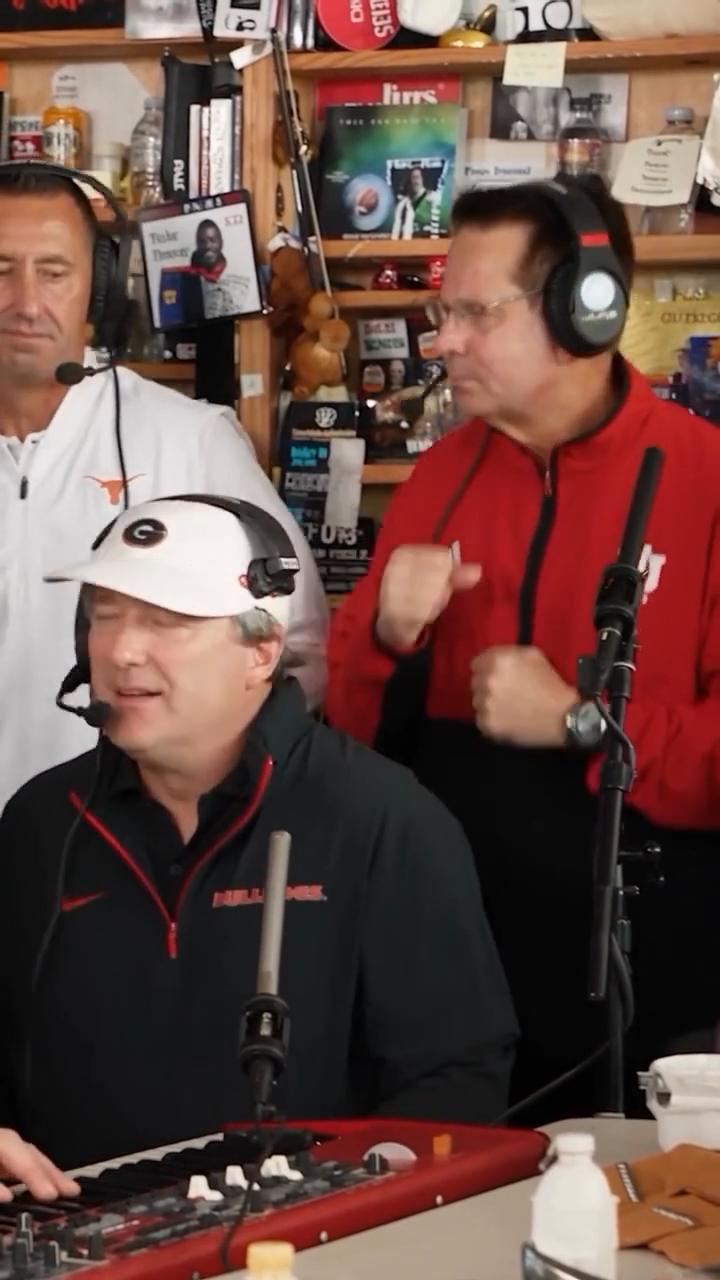
The clip shows the source performance. It is the reference for this template, not an AI-generated result.

Source · Five-cast reference

The reference chosen for this template

This template follows the full five-cast vertical performance: three performers together, then close-ups of the remaining two. Playback stays muted.

5 performers5 photo slots15-second referenceSilent MP4

Reference selected for Outstanding Tiny Desk AI
This site is independent and is not affiliated with the creator. Social counts are not used as evidence of generation quality.

From the source to your duo

  1. Source

    The two-person indoor dance chosen by the user.

  2. Reference

    A continuous 15-second segment, with depth and pose references.

  3. Your version

    Photo 1 guides the front/right dancer; photo 2 guides the back/left dancer.
What the 15-second reference contains

  1. Start

    The dancers raise and open their arms while stepping together.

  2. Middle

    Sideways body dips lead into hands near the head and a turn.

  3. End

    The duo opens their arms and steps outward in the same fixed-camera framing.

Give each dancer a clear photo

Use two separate adult portraits, with clear faces and good lighting. The order matters.

Use

  • One consenting adult per photo
  • Clearly visible faces
  • Even, soft lighting
  • Most of the body and clothing visible

Avoid

  • Group photos in either slot
  • Blur, strong filters or covered faces
  • Heavily hidden limbs
  • Minors, public figures or screenshots
Read the complete photo guide

The motion reference guides choreography and framing. Generated identities follow the two uploaded photos; the source audio is not included.

A prepared dance

The choreography is ready.

The template supplies the five-person performance and vertical framing. Choose the photos, review the quality and credit total, then generate.

01 / MOTION

Follow the dance together

The continuous reference guides both dancers through the same choreography.

02 / IDENTITY

A photo for each dancer

Separate ordered photo inputs help keep both identities consistent.

03 / SIMPLE

Choose, review and generate

Review quality and credits before generation. Track progress in your dashboard.

Five-person desk performance

One scene available

Five-person desk performance

The reference opens with three performers together, then cuts to close-ups of the remaining two.

SceneFive-person desk performance
FormatVertical 9:16
InputFive adult photos
WorkflowUpload, choose, generate

A good fit if you want

  • Two people doing the Outstanding Tiny Desk together
  • A short dance video without writing a prompt

Choose another workflow if you need

  • —A custom dance routine or long-form film
  • —Exact control over every hand and facial detail
Step by step

How to make an Outstanding Tiny Desk AI video

Four steps from your phone or laptop. No editing timeline and no prompt to write.

01

Add five photos

One clear adult photo in each role: keyboard, left, right, cap close-up, then saxophone.

02

Choose quality

Review version, resolution and the exact credit total.

03

Generate your cast

Use credits after signing in or buy one video without an account. Track progress from your private order page or dashboard.

04

Download and share

Download the silent MP4 and add permitted music in your publishing app. Guest buyers receive a private result link at the checkout email.

Two ways to buy

Pay for one video or keep credits

Buy one video without signing up, or choose a credit pack for future videos. Credit balances do not expire.

Buy one video without signing up · from US$7.99No account required · Automatic refund if generation or photo review failsMake a video

One-time payment · no subscription · unused credits do not expireMake a video

Outstanding Tiny Desk guides

Make a better video before you spend.

Short, practical answers about the trend, photos, prompts, troubleshooting and publishing.

Questions before you start

Good to know.

Helpful details about photos, generation, credits and your finished video.

Which five photos should I upload?

Upload one clear photo of each adult. Use visible faces and good lighting. Photo 1 maps to the front/right dancer; photo 2 maps to the back/left dancer.

How many credits will my video use?

It depends on the selected version and quality. The exact total is shown in the generator before you confirm.

What happens if the generation fails?

Failed credit jobs return credits. Failed guest generations or photo-review failures are refunded to the original payment method.

How long does a video take?

Most renders take a few minutes. You can leave the page and check status in your dashboard later.

How are the five photos and the video handled?

The five photos and the result are deleted after 30 days and are not published as examples without permission.

Can I use someone else's photo?

Only use adult photos you have permission to use. Do not upload minors, public figures or non-consenting people.

Who is in your cast?

Five photos, one desk performance, and your own vertical video.

Make a video